
Earlier this year we added support for bun to our list of supported package management tools for Javascript. bun is much more than a package manager for Javascript (go read about it), but for the purposes of this post we're going to keep to the dependency management side of the house -- after one final shout out to bun's creator.
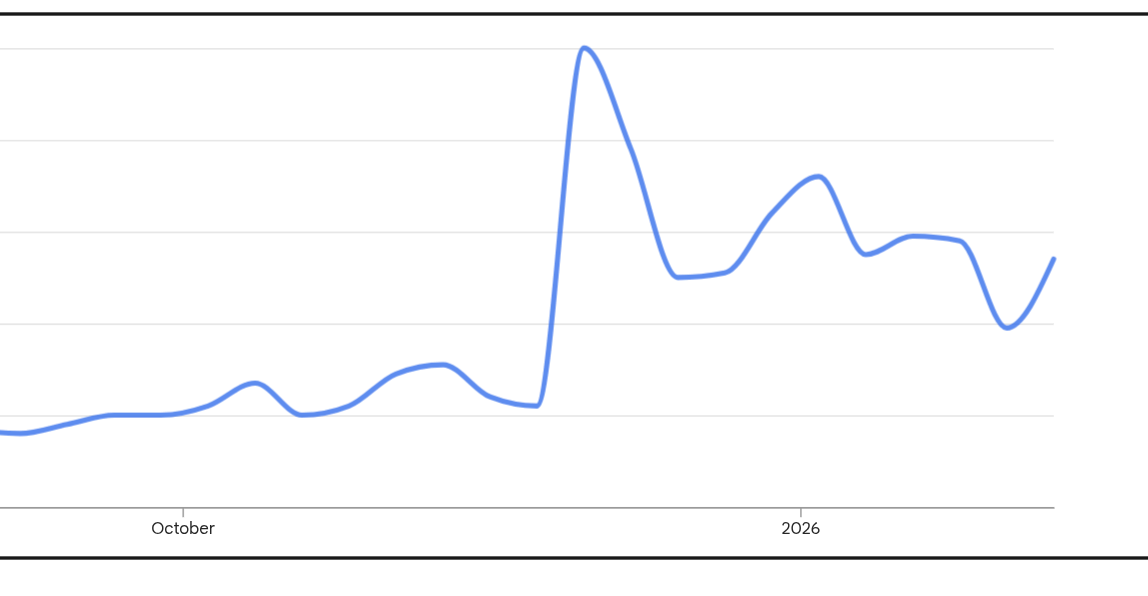
bun's popularity has seen a major spike in recent months as it joined Anthropic and based on Google's Search Trends the term "install bun" is up 20% even over the past month alone.
To kick things off, let's get it installed.
Navigating to https://bun.com we're greeted with an easy curl | bash install. Instead of actually running curl -fsSL https://bun.sh/install | bash as instructed, we'll first download the installer and take a quick peek at it like any good "chmod 000er" would.
/ # apk add curl
fetch https\://dl-cdn.alpinelinux.org/alpine/v3.22/main/x86\_64/APKINDEX.tar.gz
fetch https\://dl-cdn.alpinelinux.org/alpine/v3.22/community/x86\_64/APKINDEX.tar.gz
(1/9) Installing brotli-libs (1.1.0-r2)
(2/9) Installing c-ares (1.34.6-r0)
(3/9) Installing libunistring (1.3-r0)
(4/9) Installing libidn2 (2.3.7-r0)
(5/9) Installing nghttp2-libs (1.65.0-r0)
(6/9) Installing libpsl (0.21.5-r3)
(7/9) Installing zstd-libs (1.5.7-r0)
(8/9) Installing libcurl (8.14.1-r2)
(9/9) Installing curl (8.14.1-r2)
Executing busybox-1.37.0-r19.trigger
OK: 12 MiB in 25 packages
/ # curl -fsSL https://bun.sh/install > installer
/ # less installer
...
No obvious issues here, and we're in a disposable environment anyway, so let's run the installer.
/ # chmod +x ./installer && ./installer
############################################################################################################################################################################### 100.0%
bun was installed successfully to ~/.bun/bin/bun

Manually add the directory to ~/.bashrc (or similar):
  export BUN_INSTALL="$HOME/.bun"
  export PATH="$BUN_INSTALL/bin:$PATH"

To get started, run:

  bun --help
Next we'll follow these instructions and export the variables in our current session:
/ # export BUN_INSTALL="$HOME/.bun"
/ # export PATH="$BUN_INSTALL/bin:$PATH"
Now that we've got bun installed and configured, we'll create a project directory.
/ # mkdir proj
/ # cd proj
/proj #
In the background I'll log into https://hextrap.com and navigate to one of my existing firewalls, create a new set of credentials, and click the "Bun" tab to see how to configure things.
I've got 2 options for configuring Bun to use Hextrap:
- Use
$HOME/.npmrcor.npmrcin my project directory which Bun will use automatically - Create a Bun-specific
bunfig.tomlfile
Let's just create a bunfig.toml --
Jumping into vim I'll create the following:
[install]
registry = "https://[username]:[password]@npm.hextrap.com/"
Now, let's try to install a package I know for a fact isn't on my allow list.
/proj # bun add tailwindcss
bun add v1.3.9 (cf6cdbbb)
error: GET https://npm.hextrap.com/tailwindcss/-/tailwindcss-4.1.18.tgz - 400
That 400 error is exactly what I'm expecting to see. The Hextrap firewall is returning a 400 Bad Request because tailwindcss isn't on my allow list. After logging back in and adding the package to my allow list, I'll run it again.
/proj # bun add tailwindcss
bun add v1.3.9 (cf6cdbbb)

installed tailwindcss@4.1.18

1 package installed [671.00ms]
And there we go -- the package was allowed.
We're hoping to see Bun continue to drive the Javascript ecosystem forward as it matures!